Unlock Huawei E5372 (Megaphone MR100-3, MTS 823F).
- Price in currencies:
- 2.43 $ · 233 RUB · 2.21 €
- Category:
- Cell phone unlock
- Sales:
- -1
- Refunds:
- -1
- Seller:
- Decker · about the seller and their products
DESCRIPTION
Unlock Huawei E5372 (Megaphone MR100-3, MTS 823F).
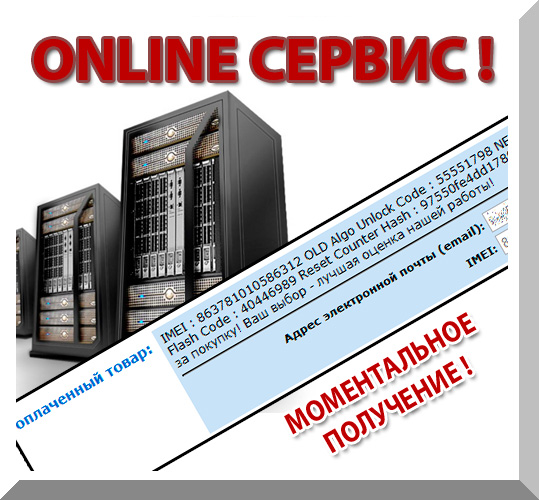
Unlock router Huawei E5372 (Megafon MR100-3, MTS 823F, MTS 826FT). Unlocking of the router from any operator is carried out by using a unique IMEI code NCK received specifically for your device. The customer receives the NCK code corresponding to its IMEI automatically immediately after payment. Answer format contains the following information:
IMEI: xxxxxxxxxxxxxxx
Unlock Code: ********
Flash Code: ********
Where Unlock Code - Unlock Code. To unlock the device, insert the SIM-card of another operator, the device will ask for the unlock code. If not, enter the unlock code received by any terminal program, for example, HyperTerminal, PuTTy, Huawei Modem Terminal, DC Unlocker (in this case, it can be used as a means of AT-commands input into the device), and others. With the command:
AT ^ CARDLOCK = "nck code" - unlocking where nck code - code that you bought.
To check the number of remaining attempts to enter the unlock code, use the command:
AT ^ CARDLOCK? - Check the status of the lock and the remaining attempts to enter the unlock code. In response, the device will CARDLOCK: A, B, 0, where A - lock status, B - number of remaining attempts to unlock. A = 2 means that there simloka, A = 1 if the router is locked.
Unlock Code - Huawei E5372 (Altel, Kazakhstan), Megafon MR100-3, MTS 823F, MTS 826FT.
Flash Code - Flash code is requested when the unit´s firmware.
---------------------------
Unlock manual
---------------------------
Option 1.
1. Insert the SIM-card of another operator.
2. Run the program to connect to the Internet when connected cable.
3. Either go to the web-based interface.
4. The device will ask for the unlock code (unlock code), obtained after entering the code device will be unlocked.
Option 2.
1. Connect the USB cord to your PC.
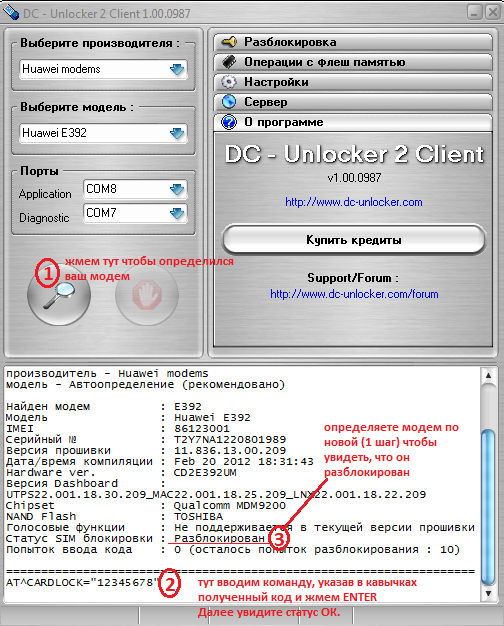
2. Download the latest version of the DC Unlocker (in this case, it will be used as a means to enter the AT-commands in the device), or connect to your device using any terminal program (in this case, you need to know the COM-port number which is determined by your device).
3. Click the magnifying glass to determine the device.
4. Type in the window (see. Figure) command AT ^ CARDLOCK = "nck code" and press Enter.
5. If the answer status OK - your router is enabled.
----------------------
Immediate delivery
----------------------
You get paid for your PIN immediately after the payment and enter IMEI! Delivery to the buyer is carried out automatically, without operator!
ps If you have paid for the goods, but it is wrong / incorrect entered your IMEI, contact the operator on the specified coordinates (e-mail, icq), your situation will be reviewed within 24 hours. Making the payment you agree to the terms of service, and confirm that you understand how to use (where to enter, etc.) resulting NCK code. Before making a purchase, check whether there are any device attempts to enter the code!
---
Sale of goods is carried out in conjunction with the site 3GInfo.
Additional information:
Immediately after payment you will receive a form to fill in the registration data, which will have to fill the following fields:
- E-mail address (email);
- IMEI;
These data will be transferred to the seller to complete the transaction of sale of goods.
REVIEWS
Reviews: (10)
Ну просто супер, спасибо. Рекомендую.
После оплаты на почту моментально пришла ссылка, перешел по ссылки, там код разблокировки, ввел код - подошел!
И самое главное, что после ребута с кнопки reset разблокировка не слетает!