DocFlow Batch Studio - PDF, Excel, CSV and Word for Windows
- Price in currencies:
- 8.95 $ · 841 RUB · 7.99 €
- Category:
- Multifunctional Utilities
- Item:
- DocFlow-Batch-Studio-1.0.0-buyer.zip (110435.94 KB)
- Uploaded:
- 24.10.2026 14:32:47
- Sales:
- 0
- Refunds:
- 0
- Seller:
- gevDev · about the seller and their products
DESCRIPTION
DocFlow Batch Studio - PDF, Excel, CSV and Word for Windows
Process PDFs, tables and text documents in one local Windows application. DocFlow Batch Studio 1.0.0 handles repeated office operations without uploading documents to a cloud service.
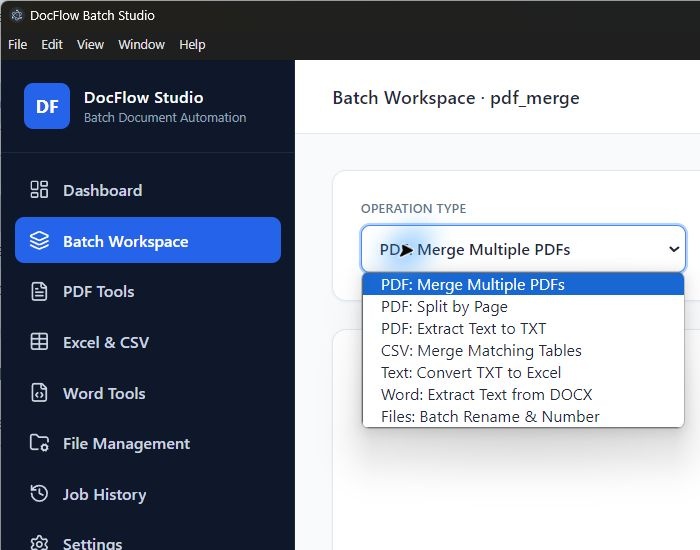
Seven operations:
- Merge several PDFs into one file.
- Split PDFs by page or a selected range.
- Extract embedded PDF text to TXT.
- Merge CSV, TXT and XLSX tables into one CSV; only the first XLSX worksheet is read.
- Convert TXT to XLSX with a selected or detected delimiter.
- Extract DOCX text to TXT.
- Batch-rename files while saving copies in an output folder.
Package: Windows x64 installer, RU/EN guide, existing license and offer terms, third-party notices and SHA256. Python and Node.js do not need to be installed separately. The application interface is English.
Requirements: Windows 10/11 x64, 4 GB RAM, about 500 MB for the installed application plus temporary space during setup.
License: commercial use on one device; resale is prohibited. A separate all-sheets XLSX-to-CSV operation and OCR are not included in this version.
Additional information:
After payment, download one ZIP from your purchase page. Extract it and run DocFlow-Batch-Studio-Setup-1.0.0.exe. START_RU_EN explains startup and the actual feature scope.
For your first operations, use document copies. PDF extraction reads embedded text; scanned-image recognition is not performed. Table merge reads the first XLSX worksheet and exports the union of columns to CSV.
The installer and application have no Authenticode signature. Seven operations were checked using synthetic files; compatibility with every user document is not claimed.
The existing license and offer terms are included unchanged. For delivery and startup questions, use messages on your purchase page; the support contact is also included in the package.
REVIEWS
Reviews: (0)
No customer reviews yet.