
ModKit — one-click mod installer builder for Unity games (BepInEx)
WHY
You wrote a mod. Now comes the part nobody enjoys: writing "download BepInEx, unzip it into the game folder, drop the .dll into BepInEx/plugins", answering "where do I put this?" in the comments, and untangling other people´s broken installs.
ModKit removes that step entirely.
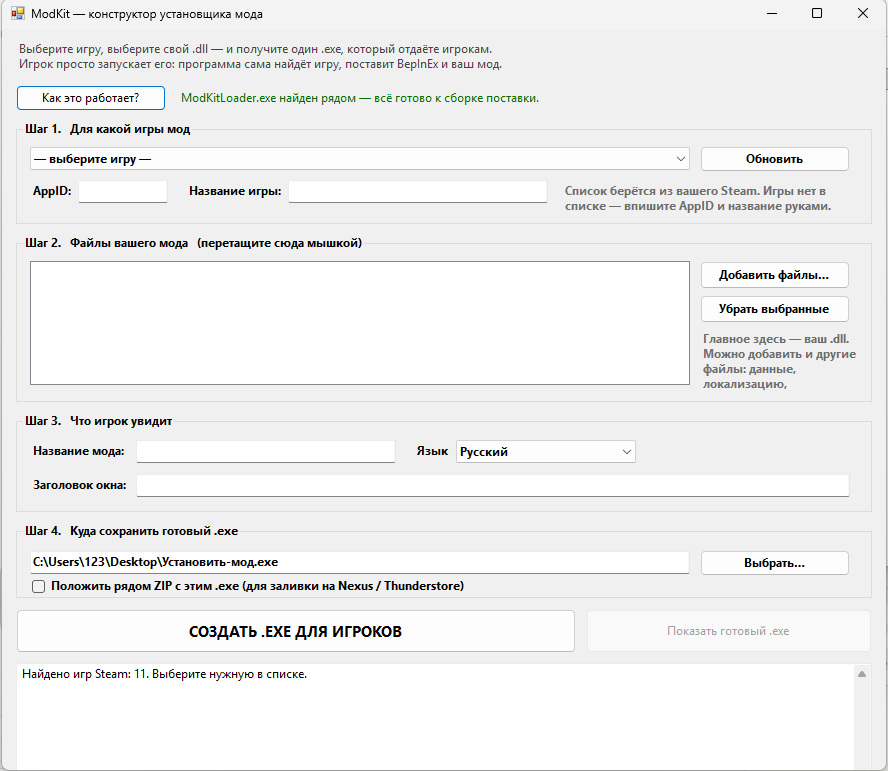
Open the window, pick your game from your own Steam list, drag your .dll in, press one button — you get a SINGLE .exe. That is what you publish. The player downloads it and runs it. Done.
WHAT THE PLAYER´S .EXE DOES
— Finds the game by itself: Steam registry (three different keys), then libraryfolders.vdf, then the app manifest, then by folder name. If it still cannot, it lists the player´s installed Steam games with numbers and lets them pick one.
— Detects architecture from the PE header of the game´s .exe, instead of guessing from the folder name.
— Installs BepInEx: latest stable release from the official GitHub, with integrity checks and repair of a broken install. Handles both the old and the new archive naming schemes.
— Installs your mod: any number of .dll files, plus data, localization and assets, all embedded in the same single file.
— DOES NOT BREAK OTHER MODS. A clean install moves the plugins folder to a dated backup instead of deleting it, and a menu item restores it. Nothing the player has is lost for good. This is exactly where most homemade installers fail.
— Speaks plain language: "close the game" instead of IOException, "run as administrator" instead of UnauthorizedAccessException.
— Silent mode and exit codes for your own installer or batch file.
— Two languages: English and Russian, switched in the builder.
HOW IT WORKS
A zip holding your settings and mod files is appended to the loader, followed by its length and a marker. On start the program reads its own file from the end, finds the marker and unpacks the payload. That is how you get one self-contained file instead of a folder of parts.
WHAT IS IN THE ARCHIVE
— the builder, the window you work with
— the loader, what gets embedded and reaches the player
— a detailed readme with FAQ and limits
Nothing to install: .NET Framework ships with Windows 10 and 11.
HONEST LIMITS
Windows only: paths, registry and Doorstop come from there.
Unity and BepInEx only.
Non-Steam games: type the name in, the player points at the folder.
BepInEx 6 and IL2CPP: works, but the archive URL has to be set in the config.
Antivirus software may flag the produced .exe: it writes into another program´s folder and downloads files. That is normal for a mod installer, but code signing is worth it for wide distribution.
LICENCE
Use it in any number of your own mods, paid ones included, and distribute the resulting .exe files without limits. Reselling the builder itself as a product is not allowed.
BepInEx is a third-party open project (LGPL-2.1), downloaded from its official GitHub and not included here.
GETTING STARTED
1. Unzip the archive anywhere. Keep both .exe files side by side.
2. Run the builder (Конструктор-установщика.exe).
3. Step 1 — pick your game from your Steam list. The AppID fills itself in.
4. Step 2 — drag your .dll straight into the window.
5. Step 3 — type the mod name.
6. Step 4 — choose where to save. Defaults to the desktop.
7. Press the big button.
The .exe you get is what you hand to players. Nothing else has to go with it: your mod and the game binding are already inside.
Details, FAQ and limits are in the readme inside the archive.
If something does not work as expected, message me through Digiseller and I will fix it.
No customer reviews yet.