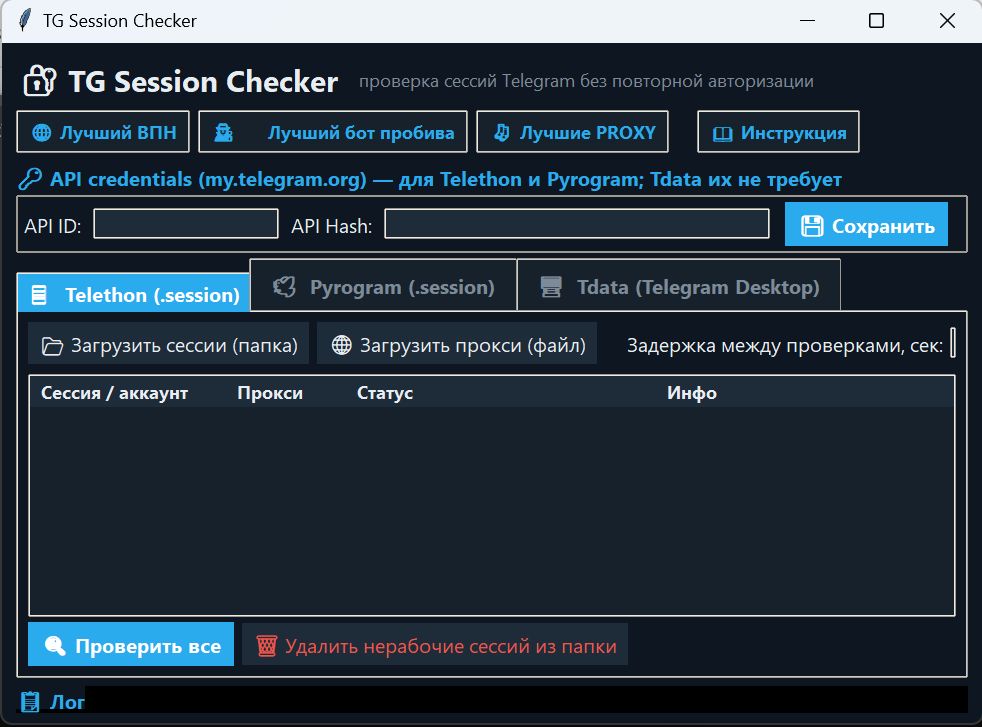
Telegram account checker. Session, Pyrogram Tdata – all in one
- Price in currencies:
- 5 $ · 472 RUB · 4.49 €
- Category:
- Item:
- text information
- Uploaded:
- 16.09.2026 16:16:32
- Sales:
- 1
- Refunds:
- 0
- Seller:
- BeSt110381 · about the seller and their products
DESCRIPTION
Telegram account checker. Session, Pyrogram Tdata – all in one
Convenient launch with run.bat and a user-friendly interface.
Open source.
What it checks
Telethon .session files
Pyrogram .session files
tdata folders from Telegram Desktop
Why it´s needed
Understand which sessions are working;
Separate live keys from revoked, expired, and banned ones;
Don´t keep dead copies of accounts on disk.
How it works
Three tabs: Telethon, Pyrogram, Tdata.
The entire folder with files is loaded, and the list appears in a table.
Telethon and Pyrogram require their own API IDs / API Hashes from my.telegram.org—once retrieved, then stored in config.json.
Tdata doesn´t require its own API keys: they are taken from Desktop data. For tdata, select the tdata folder itself or a folder containing multiple accounts (each subfolder with its own tdata is a separate account). You don´t need to select the entire "Telegram Desktop" folder.
tdata is checked in secure key transfer mode: the new session will not appear in the account´s list of active sessions.
Instructions inside.
Purchased items are non-refundable and non-exchangeable.
REVIEWS
Reviews: (0)
No customer reviews yet.