Lesson №61. (Lessons on SolidWorks)
- Price in currencies:
- 1 $ · 99 RUB · 0.9 €
- Category:
- Courses, Lessons
- Item:
- text information (687 characters)
- Uploaded:
- 08.04.2013 21:16:34
- Sales:
- 59
- Refunds:
- 0
- Customer rating:
- 5.0 of 5 +3 / −0
- Seller:
- Уроки по SolidWorks · about the seller and their products
DESCRIPTION
Lesson №61. (Lessons on SolidWorks)
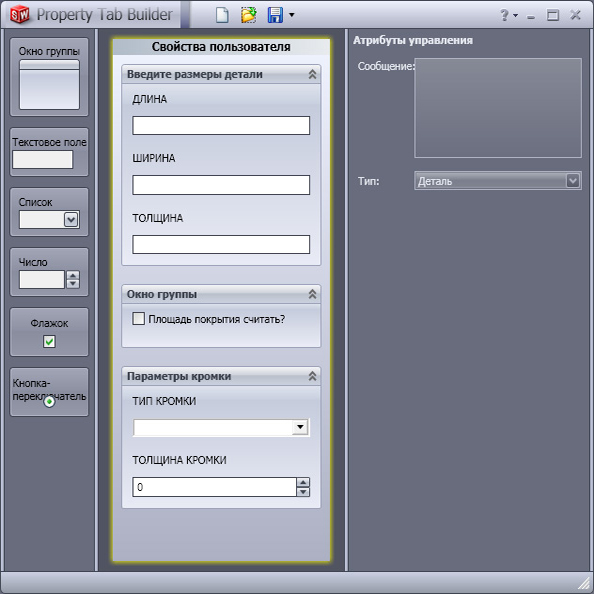
Lesson №61. Creating your own properties using the utility Property Tab Builder
Additional information:
Video tutorial is dedicated to working with the excellent and very useful tool Property Tab Builder. I would call it a kind of designer forms a closed-source. That is for you to work with the Property Tab Builder does not need to possess special knowledge of a language (html, php, etc.).
The utility is downloaded separately from the SolidWorks software and has a very friendly and intuitive interface. Frankly, I had not used it, but studied it for a day. Therefore, I think you have difficulties with the Property Tab Builder also does not arise.
This tool will be useful to users of SolidWorks, regardless of occupation. Also, I advise to read it to those designs cabinet furniture - perhaps Property Tab Builder solve many of your problems. Learn, colleagues, and improve their work and its speed.
P.S. Property Tab Builder comes with the basic package SolidWorks - nothing to download and install is not necessary!